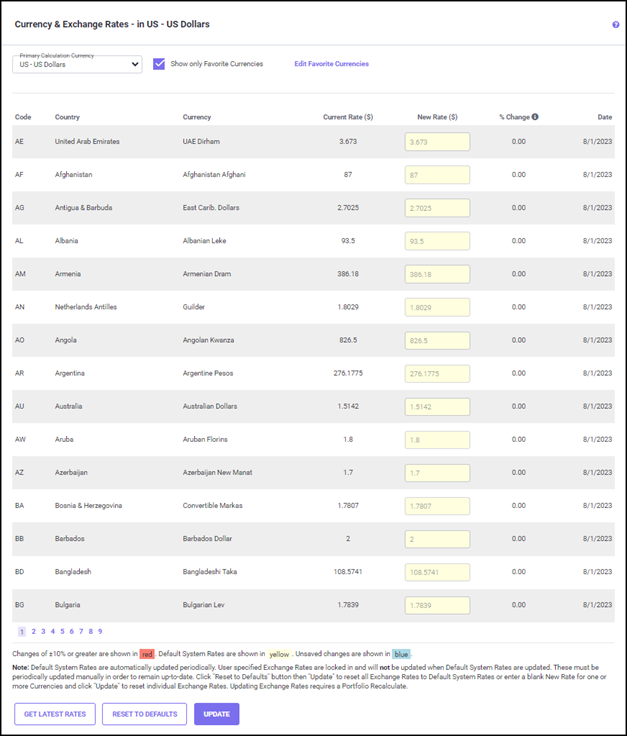
The exchange rates shown here are calculated as a ratio based on the currency of the country specified in the Calculation Settings screen. The currency of the country selected appears at the top of the screen, i.e., ‘per US Dollar’ in the example above. Each exchange rate shown here is a ratio to the US dollar. For example, it would take about 0.0036 US dollars to equal 1 Argentinian Peso. Changing the 'Calculations In Currency Of' country will then base all the exchange rates on the currency of the new country. The "Primary calculation Currency" drop-down list allows you to set the default calculation currency.
The Date shows when the currency exchange rate was last updated, either manually or through the automated process of a Monthly Update or through the GET LATEST RATES button.
The "Current Rate" column shows the saved values for a country. You may enter the new rate for a country you wish to change manually in the "New rates" column. When a new rate is entered in the New Rate column, the % Change column will show the percentage difference (shown below) when compared to the current rate. Once you click the UPDATE button, the entered rate will be updated in the "Current Rates" column.
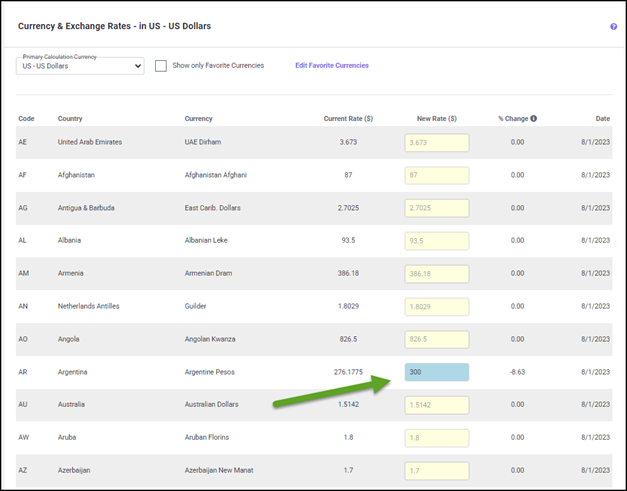
The RESET TO DEFAULTS button resets the values to current exchange rates.
Click UPDATE to save any changes.