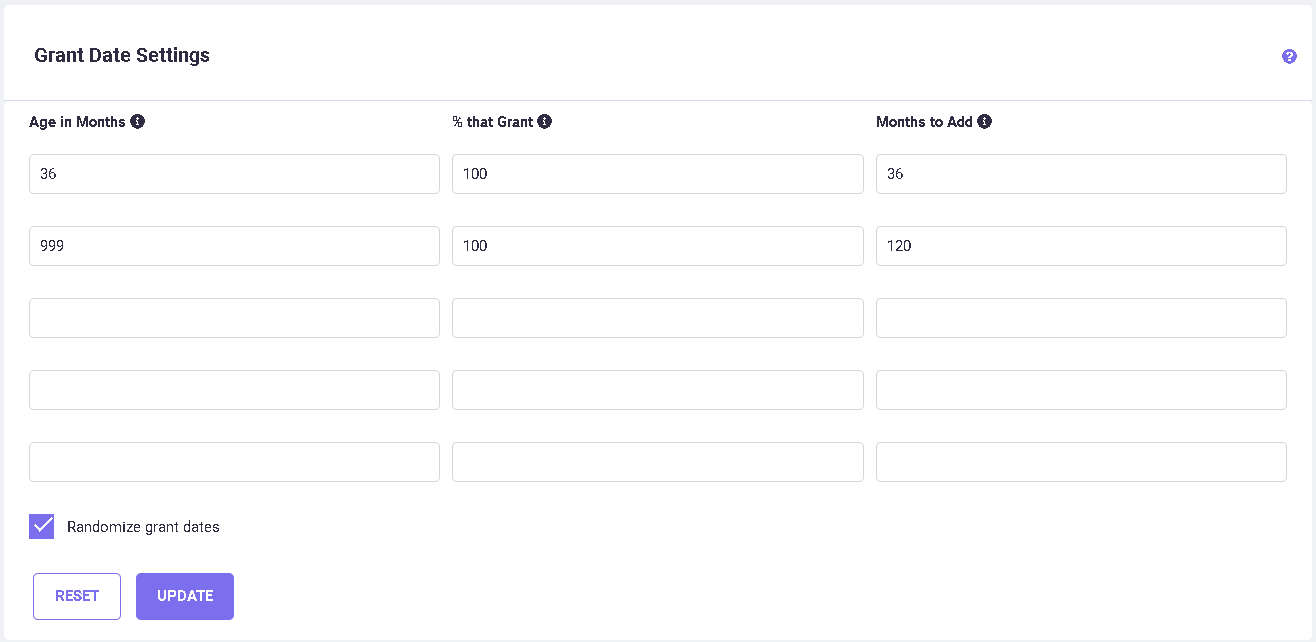
The fields are defined as follows:
Age in Months: The 'age' of the original grant date is how many months prior to the 'base date' that it occurs. Age is listed in the table in consecutive order. When a grant date falls into an age category, the other parameters on that row are used to determine a percentage and a range for which a new grant date is calculated.
% that Grant: This percentage is applied to the costs occurring in the Grant stage and the Maintenance stages of an application. Older applications may be less likely to grant, and this percentage would typically be a smaller number to reflect that.
Months to Add: The Grant Range is the number of months used to select a new Grant date. For example, if the original calculated grant date was in the very recent past, you may want to indicate a recalculated date not too far in the future. On the other hand, if the application is a very old one, you may want to randomize the grant date within a much larger range.
The Base Date is used to calculate the estimated Grant Date for the older pending filings in your portfolio. The Base Date is the date of import of the selected database.
Estimating Grant Dates for Old Filings
Steps for Calculating Grant dates.
Step 1: Estimated Grant date: The initial estimated Grant Dates are calculated by using the timeline (i.e., default number of years to grant from filing) mentioned per country in their respective routes such as Direct/PCT filing. You can customize this timeline per country from the Timeline setting screen.
Example 1: Import Base date is 7/28/2023
| Country |
Filing Date |
Timeline (in months) |
Estimated Grant date |
| US United States of America |
7/28/2023 |
31 |
2/28/2026 |
| AR Argentina |
8/9/2021 |
60 |
8/9/2026 |
| TW Taiwan |
7/28/2016 |
43 |
2/28/2020 |
Notes:
a. Direct filing countries always calculate grant dates from their filing date.
b. Some PCT filing countries may use the PCT filing date, and some may use their own filing date to calculate the estimated grant date.
For filings up to 3 years old, this will be the final grant date displayed on the Family Dates screen of a family.
Step 2: Adjusted Grant date:
a. When an estimated grant date (MM/DD) is prior to the current (or ' Import base') date or the same as the import base date (MM/DD), but is still expected to grant, the program pushes the date into the coming year, using the same MM/DD.
Adjusted Grant Date = Estimated Grant MM/DD + the Next Year (the year following the Base Date year).
Example 2a: Import Base date is 7/28/2023
| Route |
Country |
Filing Date |
Timeline (in months) |
Estimated Grant Date |
Adjusted Grant Date |
| Direct |
PC PCT (International) |
7/28/2016 |
|
|
|
| via PCT |
CA Canada |
1/28/2018 |
79 |
2/28/2023 |
2/28/2024 |
| via PCT |
CH Switzerland |
1/28/2018 |
54 |
1/28/2021 |
1/28/2024 |
(or)
b. When the Estimated grant date (MM/DD) falls after Import base dates’ MM/DD, then the program calculates using the import base date year.
Adjusted Grant Date = Estimated Grant MM/DD + the Import Base Date Year.
Example 2b: Import Base date is 7/28/2023
| Route |
Country |
Filing Date |
Timeline (in months) |
Estimated Grant Date |
Adjusted Grant Date |
| Direct |
PC PCT (International) |
7/28/2016 |
|
|
|
| via PCT |
DE Germany |
1/28/2018 |
50 |
9/28/2020 |
9/28/2023 |
Step 3: Pushed Grant date: This date is calculated as per the values saved on the Grant Date settings screen.
These rules apply only for the older filing, so these costs aren’t lumped into the next year or two. The ‘Grant Date Settings’ screen provides this flexibility and helps you to avoid skewing the costs in your main budget years. The Grant Date settings table enables you to control the spread by adding a specific number of months to the adjusted Grant Date, based on the age (in months), which is the difference between the estimated Grant Date and the Import Base date. You can exclude (or at least push out further into the future) extra grant costs and EP validation filing and maintenance costs that would normally be estimated in your portfolio cost analysis due to these old filings that haven't granted yet.
In addition, you can set the likelihood of granting by percentage. The ‘Percent that Grant’ allows you to control how much of the cost will be included. For example, ‘100’ assumes everything will grant, thus will include 100% of the costs, whereas ‘75’ will only include 75% of the cost, etc. Initially, the above values shown in above figure are entered by default. Therefore, if the age in months is between 0-36 months, 36 months will be added to the adjusted Grant Date falling after the Import Date, and 100% costs will be included in the estimate. If the age is between 37-999 months, then the program will add 120 months to the adjusted Grant Date falling after the Import Date, and 100% costs will be included in the estimate.
When the difference between estimated grant date and import base date:
a. Is less than 3 years, then the program pushes the date to 3 years from the adjusted grant date.
Example 3a: Import Base date is 7/28/2023
| Route |
Country |
Filing Date |
Timeline (in months) |
Estimated Grant Date |
Adjusted Grant Date |
Pushed Grant Date |
| Direct |
PC PCT (International) |
7/28/2016 |
|
|
|
|
| via PCT |
CA Canada |
1/28/2018 |
79 |
2/28/2023 |
2/28/2024 |
2/28/2027 |
| via PCT |
CH Switzerland |
1/28/2018 |
54 |
1/28/2021 |
1/28/2024 |
1/28/2027 |
| via PCT |
DE Germany |
1/28/2018 |
50 |
9/28/2020 |
9/28/2023 |
9/28/2026 |
As for the above spread, in the example above (Example 3a), for the country Germany, the difference between the initial estimated Grant Date (9/28/2020) and the Import Date (7/28/2023) is 34 months, and hence 36 months are added to the adjusted Grant Date (9/28/2023). Therefore, the pushed Grant Date for DE will be 9/28/2026.
(or)
b. Is more than 3 years, then the program pushes the date to 10 years from the adjusted grant date.
Example 3b: Import Base date is 7/28/2023
| Route |
Country |
Filing Date |
Timeline (in months) |
Estimated Grant Date |
Adjusted Grant Date |
Pushed Grant Date |
| Initial |
US United States of America |
8/9/2015 |
31 |
3/9/2018 |
3/9/2024 |
3/9/2034 |
| Direct |
TW Taiwan |
8/9/2016 |
43 |
3/9/2020 |
3/9/2024 |
3/9/2034 |
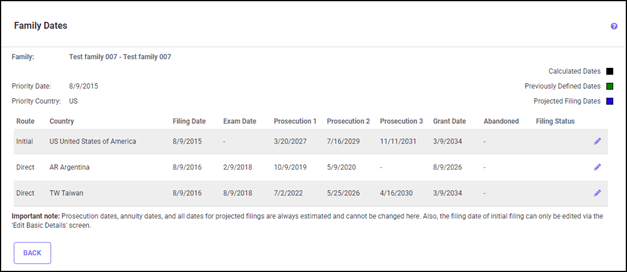
The initial estimated Grant Date for direct filing to the US is 3/9/2018 (8/9/2015 + 31 months) and the adjusted Grant Date falling after the Base Date (7/28/2023) is 3/9/2024. Since the age in months for this filing in the US is 64 months (between 36 and 999 months), 120 months (or 10 years) are added to the adjusted Grant Date (3/9/2024), and the pushed Grant Date is therefore 3/9/2034.
Example 4:
Using an EP filing date of: 03/13/2005 (with a Import date of 09/22/2011)
The initial estimated Grant Date would be: 11/13/2009 (given 'default # of years to grant' for EP = 4.67 yrs or 56 months).
Since 11/13 is > 9/22 (MM/DD of the Initial Estimated Grant Date is falling after MM/DD of the Import Date in a year), the Estimated Grant Date = Filing MM/DD + the Import Base date Year (the year following the Import Date year).
Therefore, the 'pushed' estimated Grant Date would be: 11/13/2011 (using the same MM/DD of 11/13).
However, if the Filing Date is such that the MM/DD of the Initial Estimated Grant Date falls before MM/DD of the Import Date in a year as seen in Example 2 below, this adjusted estimated Grant Date would be the same MM/DD + the next year of the import date year.
Example 5:
Using an EP filing date of: 09/27/2005 (with an import date of 09/22/2011)
The initial estimated Grant Date would be: 05/27/2010 (given 'default # of years to grant' for EP = 4.67 yrs or 56 months).
The 'pushed' estimated Grant Date would be: 05/27/2012 (using the same MM/DD of 05/27) because 5/27 < 9/22. (The MM/DD of the Initial Estimated Grant Date is falling before MM/DD of the Import Date in a year.)
Therefore, Estimated Grant Date = Filing MM/DD + the the Next Year (the year following the Import Date year).
The following filing to the US in the Test family 007 is an example where the age is more than 36 months, and the calculated grant date is pushed 10 years based on the above Grant Date settings, as seen in the figure below:
You can use this screen to create your own matrix. If you do not want the system to 'push' out any months, simply put a ‘0’ in the ‘Months to Add’ column. A ‘0’ in the ‘Percent that Grant’ column will cause filings that fall within the given range to have no effect on cost.
Let's look at some more examples after changing the values in the Grant Date Table. Using the table below for Example 1 described in the previous section, the system will keep the original adjusted Grant Date (9/27/2011). Looking at values in the table, if the age is between 36 and 60 months, the system would add an additional 24 months, changing the Grant Date to 9/27/13.
| Age in Months |
Percent that Grant |
Months to Add |
| 36 (Recent, <= 36 months old, i.e.: <= 3 yrs) |
100% (Assume all will grant.) |
0 (No extra push. Leave Grant Date as estimated.) |
| 60 (A little older, 36 to 60 months old, i.e.: 3-5 yrs) |
75% (Only 3 out of 4 will likely grant.) |
24 (Push the Grant Date out another 2 years.) |
| 120 (Much older, 60-120 months old, i.e.: 5-10 yrs) |
25% (Only 1 out of 4 will likely grant.) |
60 (Push the Grant Date out another 5 years.) |
| 999 (Too old? 120 months or older, i.e.: > 10 yrs old) |
0% (No filings this old will likely grant.) |
0 (No push needed, no costs included.) |
In this example below, the following results would occur with the initial estimated Grant Dates (with a base date of 09/22/2011):
| Initial Estimated Grant Date: |
Adjusted Grant Date (after the base date): |
Months to Add: |
New, 'Pushed' Estimated Grant Date |
| 09/27/2008 |
09/27/2011 |
0 (09/27/2008 <= 36 months from 09/22/2011) |
09/27/2011 |
| 03/20/2008 |
03/20/2012 |
24 (03/20/2008 <= 60 months from 09/22/2011) |
03/20/2014 (will include only 75% of the costs) |
| 03/20/2003 |
03/20/2012 |
60 (03/20/2003 <= 120 months from 09/22/2011) |
03/20/2017 (will include only 25% of the costs) |
| 08/20/2001 |
08/20/2012 |
0 (08/20/2001 > 120 months from 09/22/2011) |
No grant stage or maintenance costs included. |
Randomizing Estimated Grant Dates
For older filings that still have not granted, instead of simply 'pushing' the older Grant Dates out a number of months, you can create a random Grant Date by clicking the 'Use Random Grant Dates' checkbox on the Grant Date Settings screen (shown above). This date would occur sometime between the estimated Grant Date in the coming year and the Grant Date that would have been used if it were simply 'pushed' out a number of months into the future. For example, the following results could occur using the table above, with a base date of 09/22/2011:
| Initial Estimated Grant Date: |
Grant Date Estimate (after the Base Date): |
New, Randomly Estimated Grant Date |
| 09/27/2008 |
09/27/2011 |
09/27/2011 No push |
| 03/20/2008 |
03/20/2012 |
8/15/2012
Pushed 24 months, then randomly estimated sometime between 03/20/2012 and 03/20/2014, and will include only 75% of the costs.
|
| 03/20/2003 |
03/20/2012 |
6/21/2016
Pushed 60 months, then randomly estimated sometime between 03/20/2012 and 03/20/2017, and will include only 25% of the costs.
|
| 08/20/2001 |
08/20/2012 |
No push; no grant stage or maintenance costs included. |