ADD NEW USER:
The ADD NEW USER button helps you to add a new user account.
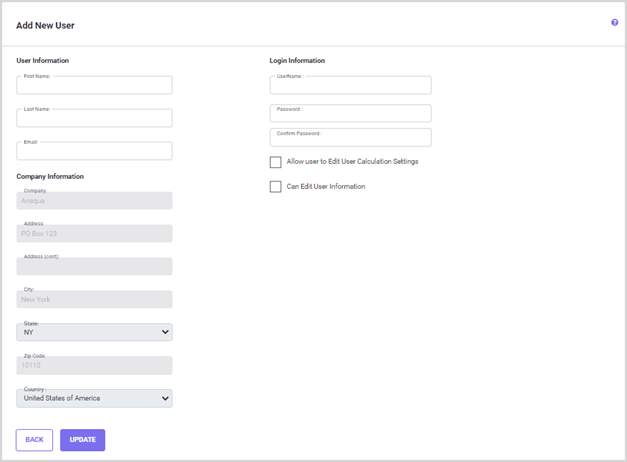
User Information: In these fields, you need to enter the First Name, Last, and Email address of the person for whom you are creating the User Credentials.
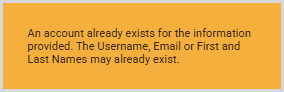
Login Information: Here you need to enter the UserName, Password and confirm pass-word. Please note that you will receive an error (shown below) if the UserName, Email, or First and Last name already exist. You can enable the "Allow user to Edit User Calcula-tion Settings" and "Can Edit User Information" checkboxes here.
Company Information: This field will be disabled, the company information provided for the main user will be used for all newly created users.
Click UPDATE to save the changes made and return to the User Account Information screen.
Edit Contact:
Click on the Edit Contact link for the user you wish to edit.
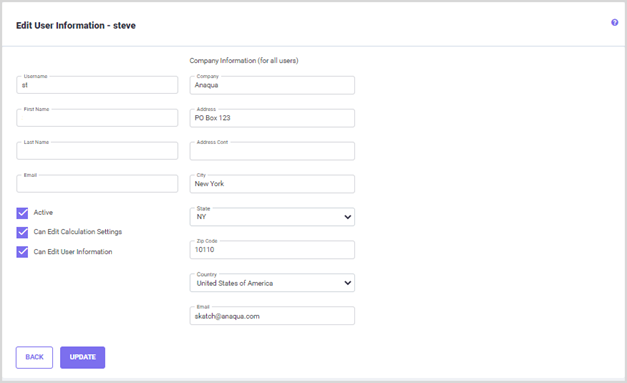
This page allows you to edit the UserName, FirstName and LastName, and Email ad-dress as well as Company information for all users. You can also disable an user account by unchecking the "Active" checkbox. The "Allow user to Edit User Calculation Settings" and "Can Edit User Information" checkboxes allows you to enable/disbale these settings for the a user.
Click UPDATE to save the changes made and return to the User Account Information screen.
Change Password:
Click on the Change Password link for the user you wish to edit.
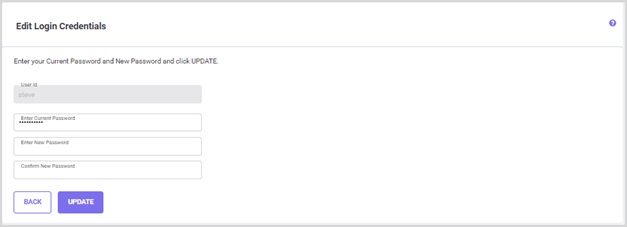
Enter the new password and confirm password in the respective fields. Click UPDATE to save the changes made and return to the User Account Information screen.