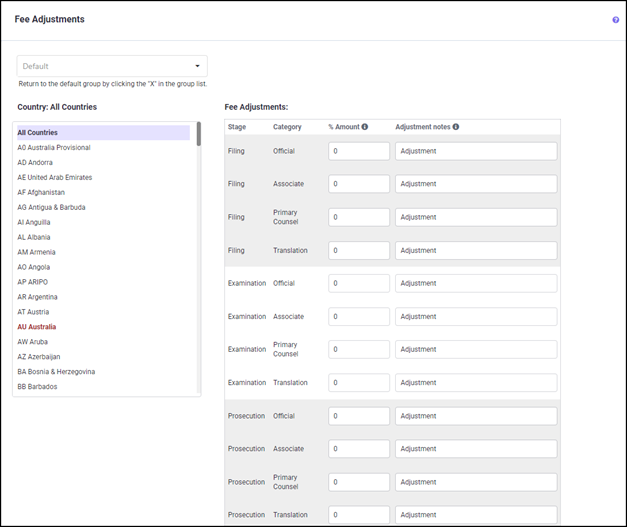
If you want the fee adjustments defined here to apply to all patent families in your portfolio, keep the program area for Fee Adjustment set to ‘None’ in the Groups Definitions screen. The ‘Default Group’ is then used for adjusting fees globally across all groups.
ADJUSTMENT FACTOR
The adjustment factors are based on percentages. You can enter separate adjustment factors for the Associate’s Charges, Translation Costs, Official Charges and In-House Charges catego-ries.
To change the Adjustment Factors, click into the desired field and enter the percentage val-ue. For example, you may enter 33, 33.33 or -33.33 in the ‘Amount(%)’ field. To cancel a pre-viously entered percentage value, replace it with a zero. The text ‘Adjustment’ is already en-tered as a default in the ‘Adjustment Text’ field. You can change the text to something more appropriate for your needs because the text entered here will appear as an additional line in the Family Details Report. These amounts also affect the totals in the summary reports, though there is no separate line item.
For example, you file all applications in China through an associate who gives you a 10% dis-count in filing fees and a 20% discount in translation charges at the filing stage. You can set the Adjustment factors as shown in the below figure to automatically reflect the discount:
The above specified adjustments will then be included in the estimate for China at the Filing stage for all the filings in your portfolio, as seen in the Family Detail report below:
EDITING FEE ADJUSTMENTS
Steps to add Fee Adjustment
1. Click on the country you wish to edit or choose ‘All Countries’ to adjust the fees across all countries.
2. Select the appropriate stage and cost category for which you wish to enter the ad-justment percentage and descriptive text. (See more details regarding this under Ad-justment Factors.)

3. When finished, click the UPDATE button to save the changes before selecting another country.
The countries with user-defined fee adjustments will appear in red in the Countries list.
FEE ADJUSTMENT BY GROUP
The Fee Adjustments in the program allow you to customize different fees for countries by groups.
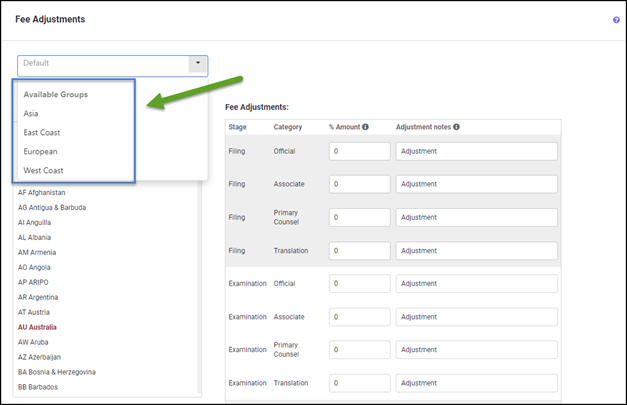
To set Fee Adjustments by groups, you must select a group category under Group Assign-ments for Fee Adjustments in the Group Definitions screen.
Once you've selected which groups to use, you can customize the Fee Adjustments for a par-ticular group by selecting the group from the drop-down list, defining the Fee Adjustments as described in the above section. When the changes are done, click UPDATE to save the chang-es.
Any group not selected here will use the 'Default' Fee Adjustments in the families that are assigned to those groups.